This is default featured post 1 title

Go to Blogger edit html and find these sentences.Now replace these sentences with your own descriptions.

This is default featured post 2 title

Go to Blogger edit html and find these sentences.Now replace these sentences with your own descriptions.

This is default featured post 3 title

Go to Blogger edit html and find these sentences.Now replace these sentences with your own descriptions.

This is default featured post 4 title

Go to Blogger edit html and find these sentences.Now replace these sentences with your own descriptions.

This is default featured post 5 title

Go to Blogger edit html and find these sentences.Now replace these sentences with your own descriptions.

Sunday, 8 December 2013

Java Program Development Compilation and Execution Procedure


  • In java programming language all source code is first written in plain text file ending with the java extension.
  • Those source files are then compiled into class files by the java compiler.
  • A class file doesn't contain code that is native to the processor.
  • It instead contains byte codes the native language of the java virtual machine(JVM).
  •  The java launcher tool then runs your application with an instance of the java virtual machine
Below Commands we must use for compilation and execution 
  • javac abc.java (java file)
                  abc.class
  • java abc
                   output.

Saturday, 7 December 2013

How to create Blogger Blog simple Steps

1.Open Browser and type www.blogger.com 


2.Enter Your Gmail User Name And Password : 


3.After That below window will open in same page and click on new blog

4.Enter title and address for your blog


5.Check address is available or not and title and address looks like if blog is available

If not available looks like


6.After creation it will looks like and to view your blog click on view blog


7.After click view button it will looks like

8.To change your blogger default template follow this step,

click on template

 9.Select any simple template

10.After that click on view blog template it looks like

11.It looks like

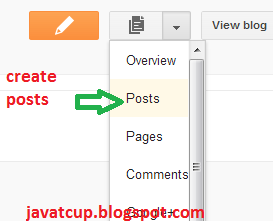
12.To Create posts click on posts

13.Click on new post like below


14.After that type post title and content of the post and click on publish button

15.It Looks like

16.After publish it looks like below

17.Click on view blog your post will publish on your blog

18.Your blog address(URL) looks like

19.That's it Enjoy

share with your friends if you like...

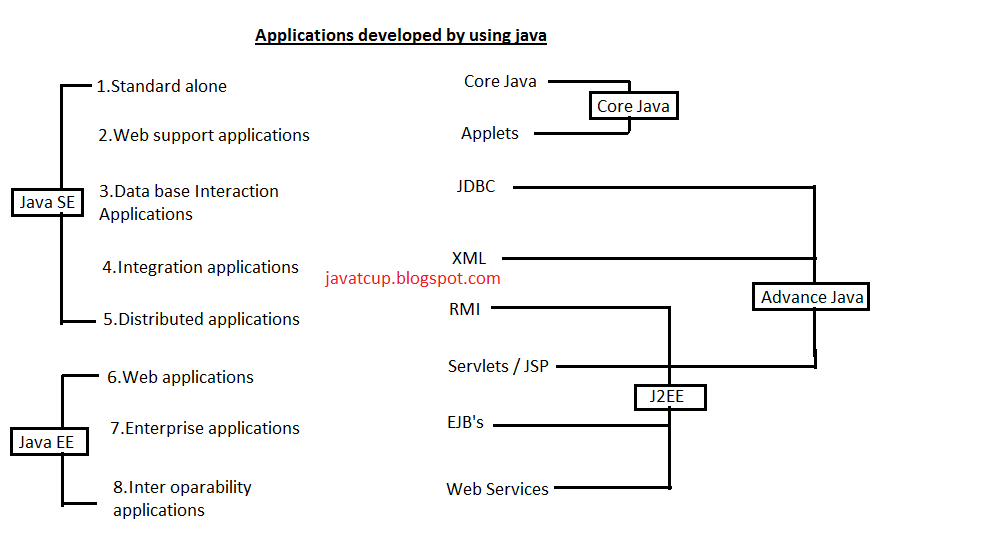
Types of Applications developed by using Java language.

Below Diagram shows clear explanation
Share If You Like It...

Basic Operations to performed in java application

Using only programming language we performs three operations in developing logic.

  1. Reading and Storing input data.
  2. Doing calculations for modifying data and generating output.
  3. Controlling modifications.
  4. Storing output permanently or printing it on console.

To perform first three operations every programming language contains three concepts.

  1. Datatypes: used to store data temporarily.
  2. Operations: For doing calculations.
  3. Control Statements: Used for validating and controlling modifications.

In edition 2 above three concepts we also has more concepts to perform below tasks.


  1. Reading input values from end user : IO Streams/ AWT.
  2. Sending multiple values at a time to another application : Arrays and Collections .
  3. Processing all requests at a time concurrently : Multi Threading .
  4. Handling user mistakes and user understandable message : Exception Handling.
  5. Sending and Reading data from Networking : Networking.
  6. Storing data or output permanently : IO Streams and JDBC.
  7. Executing logic in server system via web protocol : Servlets or JSP.
  8. Executing logic in server system via distributed protocols : RMI and EJB.
  9. Organizing logic Development by making it reusable from multiple applications by writing single program to execute method from different sub classes of an object : OOPS , LCRP , MVC.


Thursday, 5 December 2013

How Java Achieved Platform Independency ?

Java Achieved platform independency by moving machine language generation from compilation phase to execution phase by introducing byte code and JVM.

  • Byte code is An Intermediate code which is the native language of JVM.
  • JVM is translated software it runs java byte code by converting it into current OS machine language.
Java slogam: Write Once Run Anywhere (WORA).

Diagram Shows Java Platform Indipendency:

Click on image for Zoom


Share with your friends if you like...

Why C , C++ Languages are platform dependent? Why C Programming can't execute Different Operating System?

Because the compiled code contains machine language whose format only understandable by current operating system in which we compile.
That means if we compile in windows Operating System ,we can execute it in any higher version of windows Operating System but not in different Operating System either in Linux/Solaris.

Below Diagram shows Clear Explanation:

Click on image for zoom

Conclusion :

  • From the above diagram we can say C-compiler software is different from Operating System,because it has to generate machine language separately specific to Operating System.  
  • Since C Software means Compiler +  Linker + header Files. 
  • C Software is also platform dependent.as compiler is dependent.hence one OS C Software will not work in another OS.

Common Terminology using programming language

1.Source Code : Developer written program is called source code.            
   Example:  .c , .cpp , .java , .cs 
2.Compiler code:Compiler generated from source code is called compiler code.            
   Example:  .obj , .class , .msil
3.Executable code:The program i.e ready to execute and get output.          
   Example: .exe , .bin , .sys , .cmd , .sh , .dll
4.Compiler/interpreter: Translated software converts source code into platform understandable code.                                                                                   
   Example: OS , JVM , CLR(.NET)
5.Compilation:The process of converting source code into compiled code is called compilation.
6.Execution:The process of running compiled code to get output is called execution.

     Difference between Compiler and Interpreter: Compiler converts complete source code into compiled code at a time.where as Interpreter converts line by line.

Generally programming languages interpreter is used for translating part of the program.Java programming language is called interpreter is called interpreter programming language.because it also uses interpreter for java programming execution.

Frameworks

1.     Struts
2.     Hibernate
3.     Springs are not developed by sun micro system.They are developed by other companies by using java language and technologies.
4.     Hibernate is develop to solve JDBC Transaction problems it is developed by Gavin King.
5.     Struts is develop to solve the problems on servlets and JSP.It is developed by Apache Company.
6.     String is Framework of Framework.it is given to integrate java frameworks in projects.this is the cause Springs framework called integration framework.it is developed by Rod Johnson.
7.     Java has totally,
  • Language Concepts
  • API
  • Technology
  • Frameworks
In Industry Projects are developed using frameworks.

The below diagrams shows above Four things developing order.
Click on image for zoom


introduction to Java Language

·        
Java is a programming language.

·         platform and technology ,it has syntax's to develop program,so it is language.

·         It has it's own Environment to execute java program i.e JVM (Java Virtual Machine) so is is Platform.

·         It has Ready made code to develop programs for reading data from network and storing data permanently in data base so it is Technology.

·         Servlets ,Jsp, for Reading data from Network down.

·         JDB,EJB for storing data in database permanently.

 click on image for zoom

Wednesday, 4 December 2013

Welcome To JavaTCup


I am Harishkumar Reddy ,Started this blog to share my knowledge to this world as my level best.Many of the students, they are struggling to explain the exact answer in interview.I will give clear explanation on every topics as my Knowledge.In this blog i am going to explain core java , Jdbc, Servlets ,JSP Servlets ,Oracle ,My Sql ,HTML ,CSS and many more we will update soon.Thank you.

Harishkumar Reddy


Connect With Me on    Twitter Facebook Google Plus LinkedIn RSS Feed Email


Share

Twitter Delicious Facebook Digg Stumbleupon Favorites More